Power Apps vs Traditional Application Development: A Complete Enterprise Comparison
As organizations accelerate their digital transformation initiatives, one question continues to surface among CIOs, IT leaders, and business stakeholders:
Should we build applications using Microsoft Power Apps or invest in traditional application development?
The answer isn’t as straightforward as choosing one over the other. Both approaches have distinct advantages depending on the business problem, scalability requirements, compliance standards, and long-term IT strategy.
In this comprehensive guide, we’ll compare Microsoft Power Apps vs Traditional Application Development across multiple enterprise parameters, helping you determine which solution best aligns with your organization’s goals.
What is Microsoft Power Apps?
Microsoft Power Apps is a low-code application development platform within the Microsoft Power Platform ecosystem. It enables organizations to rapidly create web and mobile business applications with minimal coding while integrating seamlessly with Microsoft 365, Dynamics 365, Azure, SharePoint, SQL Server, Dataverse, and hundreds of third-party systems.
Power Apps is particularly effective for:
- Internal business applications
- Process digitization
- Approval workflows
- Data collection apps
- Field service applications
- Employee self-service portals
- Inspection and audit applications
- Inventory and asset management
Rather than replacing professional development entirely, Power Apps empowers organizations to deliver business applications faster while reducing development complexity.
What is Traditional Application Development?
Traditional application development refers to building software using programming languages such as:
- .NET / C#
- Java
- Python
- Node.js
- PHP
- Angular
- React
- Flutter
- Swift
- Kotlin
These applications are designed, coded, tested, deployed, and maintained by professional software engineering teams.
Traditional development offers maximum flexibility, making it suitable for highly customized enterprise software, customer-facing platforms, SaaS products, and complex systems requiring unique business logic.
Power Apps vs Traditional Application Development
1. Development Speed
Power Apps
Power Apps dramatically reduces development time through drag-and-drop components, reusable templates, and pre-built connectors.
A business application that traditionally requires 8–12 weeks can often be developed in a few days or weeks, depending on complexity.
Best For
- Rapid application delivery
- MVPs
- Internal business tools
- Departmental solutions
Traditional Development
Every UI component, backend service, API, authentication mechanism, and database layer is built or configured manually.
Development cycles are considerably longer due to architecture planning, coding, testing, deployment, and maintenance.
Winner: Power Apps
2. Development Cost
Power Apps significantly reduces development costs because:
- Less coding is required
- Smaller development teams are needed
- Maintenance is simplified
- Faster deployment reduces project timelines
Traditional development generally involves:
- UI Developers
- Backend Developers
- Database Engineers
- DevOps Engineers
- QA Teams
- Project Managers
This naturally increases project costs.
Winner: Power Apps for internal business applications.
3. Customization & Flexibility
Traditional development provides virtually unlimited customization.
Organizations can:
- Build proprietary architectures
- Create custom APIs
- Implement advanced algorithms
- Develop unique user experiences
- Optimize application performance
- Integrate specialized business logic
Power Apps, while highly flexible within the Microsoft ecosystem, has platform constraints. Very complex UI designs, advanced rendering, or highly specialized functionality may require custom components or external services.
Winner: Traditional Development
4. Enterprise Integration
Integration is one of Power Apps’ strongest capabilities.
It includes native connectors for:
- Microsoft 365
- SharePoint
- Microsoft Teams
- Outlook
- Dynamics 365
- SQL Server
- Azure
- SAP
- Oracle
- Salesforce
- ServiceNow
- REST APIs
With Power Automate, organizations can also automate workflows across these systems without extensive coding.
Traditional applications can integrate with virtually any platform, but each integration typically requires custom development, API management, authentication handling, and ongoing maintenance.
Winner: Power Apps for Microsoft-centric organizations.
5. Scalability
Traditional enterprise applications are designed for large-scale workloads involving:
- Millions of users
- High transaction volumes
- Complex microservice architectures
- Distributed cloud environments
- Global deployments
Power Apps is highly scalable for enterprise business applications but is generally intended for operational workloads rather than high-volume public-facing platforms.
For organizations already using Microsoft Dataverse and Azure, Power Apps can comfortably support enterprise-scale internal applications.
Winner: Traditional Development for large-scale public applications.
6. Security & Governance
Power Apps inherits Microsoft’s enterprise-grade security capabilities, including:
- Microsoft Entra ID (Azure AD) authentication
- Role-Based Access Control (RBAC)
- Microsoft Dataverse security model
- Data Loss Prevention (DLP) policies
- Conditional Access
- Multi-Factor Authentication
- Microsoft Purview integration
- Audit logs and compliance features
Traditional applications require security to be architected, developed, tested, and continuously maintained by the development team.
While both approaches can achieve enterprise-grade security, Power Apps provides many capabilities out of the box within the Microsoft ecosystem.
Winner: Power Apps for Microsoft environments.
7. Maintenance & Updates
Traditional applications require:
- Version upgrades
- Infrastructure maintenance
- Framework updates
- Security patches
- Bug fixes
- Server monitoring
Power Apps minimizes operational overhead because Microsoft manages the underlying platform, infrastructure, and service updates.
Organizations primarily maintain business logic and application enhancements rather than the platform itself.
Winner: Power Apps
8. User Experience
Traditional development enables completely custom user interfaces, animations, responsive layouts, and branded experiences across web and mobile platforms.
Power Apps offers modern, responsive interfaces suitable for business users, though it has design constraints compared to fully custom applications.
If branding and customer experience are critical differentiators, traditional development offers greater creative freedom.
Winner: Traditional Development
9. Citizen Development vs Professional Development
Power Apps enables business users and power users to participate in application development, reducing dependency on IT for every request. This accelerates innovation while allowing IT teams to focus on strategic initiatives.
Traditional development relies primarily on experienced software engineers, making delivery dependent on development capacity and project priorities.
Organizations often achieve the best results by combining citizen development with IT governance.
Which One Should Your Business Choose?
The decision depends on your business objectives.
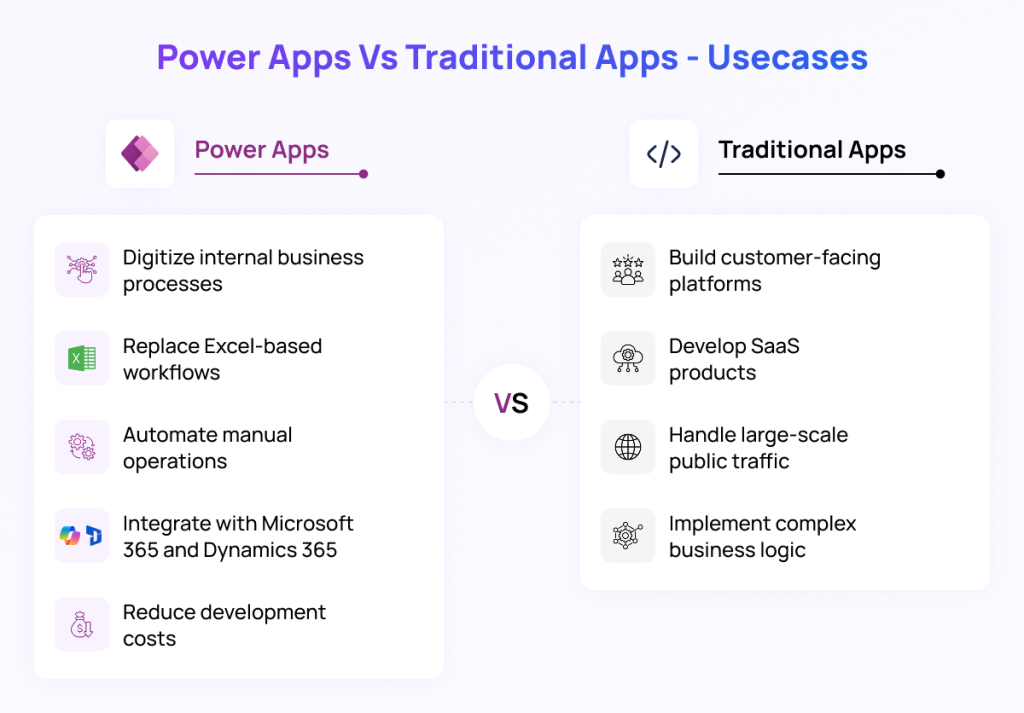
Choose Power Apps if you need to:
- Digitize internal business processes
- Replace Excel-based workflows
- Automate manual operations
- Build apps quickly
- Integrate with Microsoft 365 and Dynamics 365
- Reduce development costs
- Empower business teams with low-code solutions
Choose Traditional Development if you need to:
- Build customer-facing platforms
- Develop SaaS products
- Create highly customized software
- Handle large-scale public traffic
- Implement complex business logic or advanced user experiences
Many enterprises adopt a hybrid strategy, using Power Apps for internal operational applications while leveraging traditional development for customer-facing and highly customized solutions. This approach optimizes cost, accelerates delivery, and ensures the right technology is used for each business need.
Partner with Provitious Technologies for Microsoft Power Apps Solutions
At Provitious Technologies, we help organizations unlock the full potential of Microsoft Power Platform by delivering secure, scalable, and business-focused Power Apps solutions. Our team has successfully implemented applications across diverse industries, enabling businesses to digitize operations, automate workflows, integrate enterprise systems, and significantly reduce manual effort.
From custom Canvas Apps and Model-Driven Apps to seamless integrations with SharePoint, Microsoft 365, Dynamics 365, Dataverse, SQL Server, Azure, and Power Automate, we build solutions that align with your operational and compliance requirements. Whether you’re modernizing legacy processes, creating field service applications, or developing enterprise-grade business apps, our Microsoft experts ensure rapid deployment without compromising governance, security, or scalability.
If you’re planning your next digital transformation initiative, Provitious Technologies is your trusted Microsoft solutions partner. Let us help you build intelligent business applications that deliver measurable ROI, improve productivity, and accelerate innovation.
Ready to transform your business with Microsoft Power Apps? Contact Provitious Technologies today and discover how our expertise can turn your ideas into powerful enterprise applications.