






Microsoft SharePoint Implementation Services: Fixing Governance & Document Chaos in Growing Companies
As organizations grow, so does the complexity of managing information. What starts as a few shared folders and email attachments quickly turns into scattered documents across personal drives, email threads, and multiple collaboration tools. Teams struggle to locate the latest version of files, permissions become unclear, and sensitive information can easily end up in the wrong hands.
This kind of document chaos is a common challenge for growing companies. Without a structured system in place, productivity suffers, collaboration becomes inefficient, and governance risks increase.
This is where Microsoft SharePoint implementation services play a crucial role. By creating a centralized and governed document environment, SharePoint helps organizations organize their information, streamline collaboration, and maintain proper control over business-critical documents.
Why Growing Companies Struggle with Document Governance
Document management often evolves organically within organizations. Teams adopt tools that work for them in the moment, but over time this leads to fragmented systems and inconsistent practices.
One of the most common challenges is fragmented document storage. Files may exist in shared drives, email attachments, personal folders, or various cloud platforms. When information is spread across multiple locations, employees spend unnecessary time searching for documents or recreating files that already exist somewhere else.
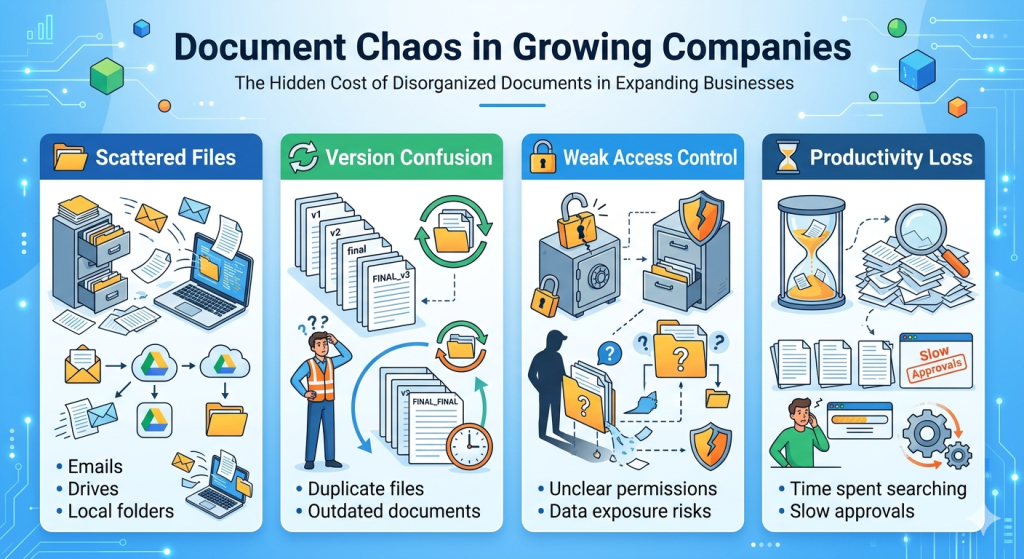
Another major issue is version control. Multiple people may edit the same document and save different copies with slightly different names. Without a clear version history, teams often end up working with outdated files, leading to confusion and errors.
Access control is another area where problems arise. As companies grow, more people need access to documents. Without structured permissions, sensitive information may be accessible to employees who shouldn’t see it, while others may struggle to access files they actually need.
Over time, these issues create operational inefficiencies and potential compliance risks. Growing organizations increasingly require enterprise document management solutions that can scale with their business and provide proper governance.
What Are SharePoint Implementation Services?
While many organizations are familiar with Microsoft SharePoint, implementing it effectively requires more than simply setting up a document library. A structured approach is needed to ensure the platform aligns with business processes, governance policies, and collaboration needs.
SharePoint implementation services focus on designing and deploying a well-organized digital workspace that enables secure document management and efficient collaboration.
A professional SharePoint consultant typically helps organizations with several key aspects of implementation. This includes designing the information architecture, organizing document libraries, defining governance policies, configuring access permissions, and integrating workflows that automate routine processes.
A reliable SharePoint implementation partner ensures that the platform is tailored to how your organization actually works. Instead of becoming just another storage system, SharePoint becomes a strategic foundation for document management and collaboration.
How SharePoint Fixes Document Chaos
When implemented strategically, SharePoint transforms the way organizations manage and access information. It introduces structure, transparency, and control into document management processes.
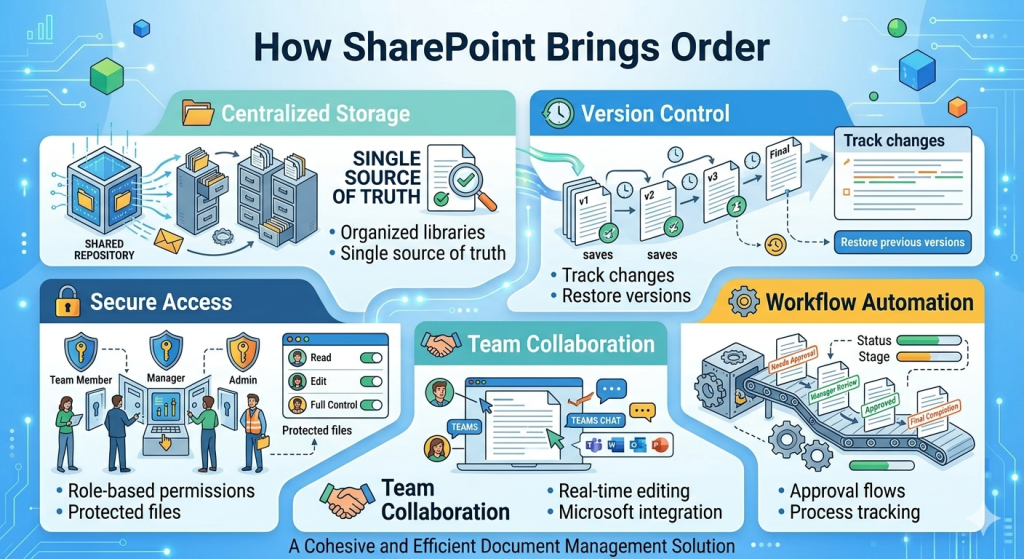
Centralized Document Repository
One of the biggest advantages of SharePoint is its ability to create a centralized document hub. Instead of storing files across multiple systems, organizations can consolidate documents within structured libraries and folders.
This centralization makes it easier for employees to locate files quickly and reduces the chances of duplicate documents being created. A well-designed SharePoint environment acts as a reliable enterprise document management solution where teams know exactly where information resides.
Version Control and Document History
Version confusion is one of the most common frustrations in growing companies. SharePoint addresses this issue through built-in version control.
Every time a document is updated, the system automatically tracks changes and maintains a version history. Users can see who edited a file, when it was modified, and even revert to previous versions if necessary.
This transparency eliminates the uncertainty around “which version is the latest,” helping teams collaborate with greater confidence.
Permission-Based Access Control
As organizations scale, controlling access to sensitive information becomes increasingly important. SharePoint provides granular permission management that allows businesses to control who can view, edit, or share specific documents.
Permissions can be assigned based on roles, teams, or departments. This ensures that confidential information remains protected while still enabling efficient collaboration.
A structured governance model also helps organizations maintain better compliance with internal policies and industry regulations.
Workflow Automation for Document Processes
Many organizations still rely on email-based approvals or manual processes for reviewing documents, contracts, and policies. These workflows can be slow, inconsistent, and difficult to track.
SharePoint enables SharePoint business automation by integrating automated workflows into document management processes. Approvals, notifications, and document routing can be configured so that tasks move automatically through the appropriate stages.
For example, when a policy document is uploaded, it can automatically trigger an approval workflow involving relevant stakeholders. Once approved, the document can be published to the appropriate library. Automation not only saves time but also reduces human error and improves process visibility.
Signs Your Organization Needs a Better Document Management System
Many growing companies start experiencing document management challenges as teams expand and collaboration increases. Common signs include employees struggling to find documents, multiple versions of files existing across different locations, excessive reliance on email attachments, and unclear access permissions for sensitive information.
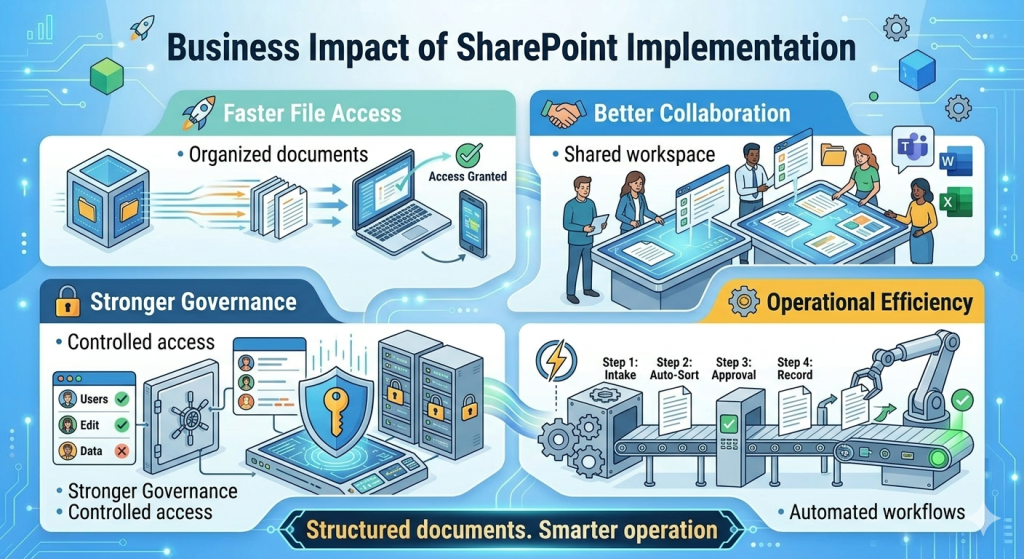
Addressing these issues with SharePoint implementation services helps organizations create a structured and centralized document environment. With the right governance model in place, SharePoint enables better collaboration, secure access control, and organized document management.
By implementing SharePoint strategically, businesses can reduce time spent searching for information, streamline internal workflows, and build a more efficient and scalable enterprise document management solution.
Why Choose Provitious Technologies for SharePoint Implementation Services
At Provitious Technologies, we approach SharePoint implementation with a focus on structure, governance, and real business usability. Instead of simply deploying a platform, our team designs SharePoint environments that align with your organization’s workflows, collaboration needs, and document governance requirements.
As an experienced SharePoint consultant and implementation partner, we help organizations create secure, well-organized, and scalable document management systems. The result is a digital workplace where teams can collaborate efficiently while maintaining control over critical information.
If your organization is looking to eliminate document chaos and build a structured enterprise document management solution, Provitious Technologies can help you implement that. Write to us at info@provitious.com